I'll never forget the first time I tried using AI to help with a writing project. I typed in something vague like "write about marketing," and what came back was... well, let's just say it wasn't helpful. That frustrating experience taught me something crucial: when it comes to AI, garbage in equals garbage out. The quality of your prompt directly determines the quality of the output—whether you're improving AI responses for content creation, problem-solving, or customer support.
Over time, I discovered that crafting effective AI prompts is less about luck and more about following a structure. A well-structured prompt acts as a blueprint: it clarifies your goals, guides the model, and reduces ambiguity. In an era where AI prompt engineering is becoming a critical skill, understanding the anatomy of a perfect AI prompt can dramatically enhance your productivity and creativity. In this guide, I'll share what I've learned about building better prompts, complete with practical prompt examples and reusable prompt templates that actually work.
Key Components of an Effective AI Prompt
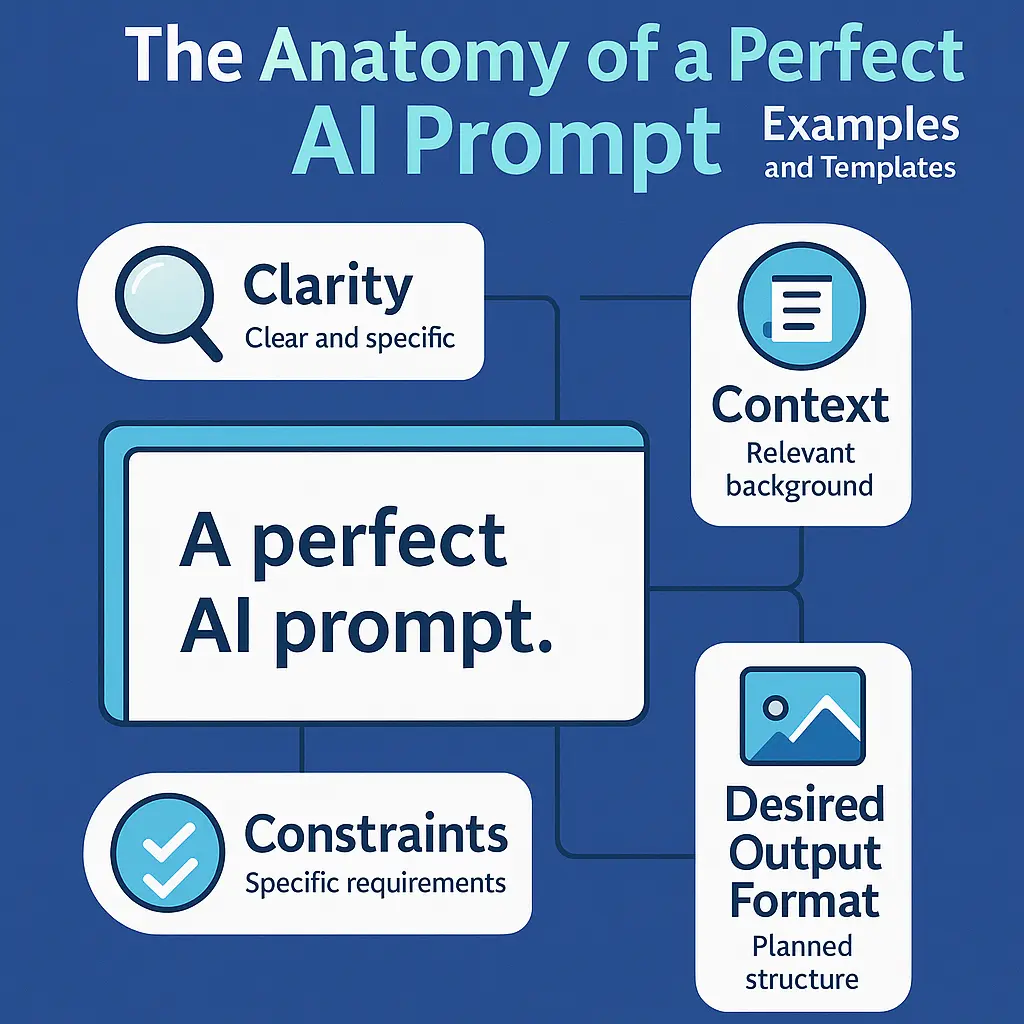
Here's what I learned after countless hours of trial and error: a perfect AI prompt isn't about writing paragraphs of instructions—it's about nailing the structure. I found that when I incorporated these six essential components into my prompts, my results improved dramatically. Each component plays a crucial role in guiding the AI toward producing the exact output you need.
1. Specificity
This was my biggest breakthrough. I used to think AI could "read my mind," but I quickly learned it can't. Being specific is absolutely essential for effective prompts. Vague prompts lead to generic, unhelpful responses, while specific prompts produce exactly what you're looking for.
Poor example (trust me, I've made this mistake):
"Write about marketing."Effective example (what I use now):
"Write a 150-word introduction explaining the importance of digital marketing for small businesses in 2025."Why it matters:
When I started being this specific, my results transformed overnight. Specific prompts eliminate guesswork and yield results aligned with your expectations. The effective example specifies length (150 words), topic (digital marketing for small businesses), timeframe (2025), and purpose (introduction). This is one of the most important AI writing tips I can share—specificity is everything.
2. Context
I learned this lesson the hard way when I asked AI to "explain how it works" without specifying what "it" was or who I was explaining it to. The result was a confusing mess. Adding background information dramatically improves accuracy and depth. Context helps the AI understand the situation, purpose, and constraints of your request.
Poor example:
"Explain how it works."Effective example:
"Explain how blockchain works for beginners, using simple analogies and avoiding technical jargon."Why it matters:
I found that context is like giving the AI a roadmap. It sets boundaries and ensures the response is tailored to your specific scenario. The effective example specifies the audience (beginners), communication style (simple analogies), and what to avoid (technical jargon). This level of context is crucial for improving AI responses and getting content that actually serves your purpose.
3. Constraints
This is where I really started to see the magic happen. When I began adding constraints to my prompts, the AI stopped wandering off in random directions. Constraints help achieve a defined prompt structure and tone. They're like guardrails that guide the AI toward producing focused, useful output.
Here are the types of constraints I use most often:
- Word count: Specify exact length or approximate range
- Format: Bullet points, essay, script, table, list, etc.
- Style: Formal, humorous, technical, conversational
- Time period or perspective: Historical context, future outlook, current trends
Effective example:
"Summarize this article in exactly 3 bullet points using neutral, objective language."Why it matters:
I discovered that the more constraints you provide, the easier it is for the AI to produce focused, useful output. Constraints eliminate ambiguity and ensure consistency in the final result. This is an essential element of the AI prompt anatomy.
4. Desired Output Format
I can't tell you how many times I forgot this step early on and ended up with content in the wrong format. Now I always tell the AI exactly how to present the final answer. Clear format instructions prevent the AI from guessing and ensure the output matches your project requirements.
Here are some format specifications I use regularly:
- "Give me a comparison table."
- "Write a step-by-step guide."
- "Create a persuasive email template."
- "Format as a numbered checklist with explanations."
- "Provide a bullet-point summary."
Why it matters:
I found that format instructions lead to structured, publication-ready content that saves me hours of reformatting. By specifying the format upfront, you eliminate the need for post-processing and ensure the AI delivers content in the exact structure you need. This is a key part of AI prompt best practices.
5. Tone
This one surprised me at first. I didn't realize how much the tone specification would change the output until I experimented with it. Tone is absolutely essential, especially for branding, writing, or customer-facing communication. The right tone ensures your content resonates with your audience and maintains brand consistency.
These are the tones I find most useful:
- Friendly
- Professional
- Academic
- Playful
- Direct
- Empathetic
- Authoritative
Effective example:
"Rewrite this paragraph using a confident, expert tone suitable for a business consultant."What I love about this example is that it specifies both the tone (confident, expert) and the context (business consultant), ensuring the AI adjusts its language and style accordingly. It's one of those AI writing tips that makes a huge difference.
6. Audience Consideration
I learned this from a frustrating experience where I asked for an explanation that was way too technical for my intended readers. Now I always tell the AI who the output is for—this influences vocabulary, depth, and the types of examples used. Understanding your audience helps the AI tailor complexity and terminology appropriately.
Example:
"Explain quantum computing to high-school students using simple metaphors."Why it matters:
I've found that audience targeting ensures clarity and relevance every single time. By specifying the audience (high-school students), the AI can adjust its language, use appropriate examples, and avoid overly complex explanations. This leads to content that is immediately understandable and useful for your target readers—a crucial aspect of creating effective prompts.
Examples of Effective Prompts
Okay, so now that we've covered the theory, let me share some real-world prompt examples that I actually use in my daily work. These demonstrate how proper prompt structure dramatically improves AI output. Each example showcases different use cases and highlights how combining multiple components creates powerful, effective prompts.
Example 1: Creative Writing
Prompt I use:
"Write a 200-word dark fantasy story about a cursed forest. Use vivid sensory details and end with an unexpected twist. Maintain a poetic, atmospheric tone."Why it's effective:
- Specifies genre (dark fantasy)
- Defines length (200 words)
- Sets tone (poetic, atmospheric)
- Requests specific elements (sensory details, unexpected twist)
- Provides clear structural expectation
What I love about this prompt is how it combines specificity, constraints, tone, and format requirements to guide the AI toward producing a complete, polished creative piece. When I started using prompts like this, my creative writing projects became so much easier.
Example 2: Technical Writing
Prompt I use:
"Explain how REST APIs work in simple terms for beginners. Use an analogy suitable for non-technical readers, and provide a 3-step summary at the end."Why it's effective:
- Clear audience (beginners, non-technical readers)
- Simplified language request
- Structured summary requirements (3-step format)
- Uses analogy for better understanding
This is one of my favorite prompt examples because it demonstrates how context, audience consideration, and format requirements work together beautifully. I use this approach whenever I need to explain technical concepts, and it consistently produces educational content that's accessible to non-experts.
Example 3: Customer Service Response
Prompt I use:
"Write a polite and empathetic customer support reply to a user complaining that their package arrived late. Offer a brief apology, explain possible reasons, and provide a 10% discount code."Why it's effective:
- Specifies tone (polite, empathetic)
- Defines purpose (customer support reply)
- Provides structure (apology, explanation, discount)
- Includes required action (10% discount code)
I learned this approach after crafting dozens of customer service emails. This prompt shows how combining tone, context, and specific requirements produces professional customer service content that addresses difficult situations appropriately without sounding robotic.
Example 4: Marketing Copy
Prompt I use:
"Create a persuasive Facebook ad for a fitness app targeting busy professionals. Use a motivational tone, highlight time-saving benefits, and keep the copy under 40 words."Why it's effective:
- Defines platform (Facebook ad)
- Specifies audience (busy professionals)
- Sets tone (motivational)
- Highlights key value proposition (time-saving benefits)
- Includes word count constraint (under 40 words)
I use this type of prompt constantly for marketing projects. It demonstrates how marketing-specific requirements—platform, audience, tone, and constraints—combine to create effective advertising copy that actually converts. This is a perfect AI prompt for anyone working in marketing.
Example 5: Educational Explanation
Prompt I use:
"Teach the concept of supply and demand to college students using a real-world example from the tech industry. Include a graph description."Why it's effective:
- Specifies audience (college students)
- Defines field (tech industry example)
- Requests specific element (graph description)
- Uses real-world context for better understanding
I discovered this approach when helping a friend create educational materials. This prompt shows how educational content benefits tremendously from audience specification, real-world examples, and structured requirements that enhance learning. It's become one of my go-to prompt templates.
Templates for Crafting Prompts
Now, here's where things get really practical. I've created three versatile prompt templates that I use constantly in my work. Feel free to adapt these for your own tasks—they incorporate all the key components we've discussed and can be customized based on your specific needs. These are the exact templates that transformed how I work with AI.
Template 1: General Writing Prompt
My go-to template:
"Write a [type of content] about [topic]. The tone should be [tone], and the target audience is [audience]. Keep the length around [word count]. Include [specific elements such as examples, structure, or constraints]."Here's how I used it recently:
"Write a blog post about sustainable living. The tone should be friendly and informative, and the target audience is eco-conscious millennials. Keep the length around 800 words. Include practical tips, statistics, and a call-to-action at the end."How to modify it:
I adjust tone, audience, and structure depending on my content type (blog, email, technical guide, etc.). This template has become my workhorse—it works well for most writing tasks and can be adapted for various formats and purposes. It's one of the most reliable prompt templates I've found.
Template 2: Problem-Solving or Explanation Prompt
My explanation template:
"Explain [concept/problem] in a way that is suitable for [audience]. Use [style: simple, technical, storytelling, analogies] and include [number] key points or steps. Avoid [terms or complexities to avoid]."Here's a real example from my work:
"Explain machine learning in a way that is suitable for business executives. Use simple analogies and include 5 key points. Avoid technical jargon and complex mathematical formulas."How to modify it:
I change the complexity level based on my readers' expertise. I found that this template is perfect for educational content, technical explanations, and problem-solving scenarios where clarity is essential. It's saved me countless hours of rewriting complex explanations.
Template 3: Marketing or Business Prompt
My marketing template:
"Create a [format: ad, headline, script, email] promoting [product/service]. Highlight [key benefits], use a [tone] tone, and keep the message within [word limit]. Make sure it appeals to [target audience]."Here's how I recently used it:
"Create a social media post promoting a productivity app. Highlight time-saving and organization benefits, use an energetic and motivational tone, and keep the message within 50 words. Make sure it appeals to busy entrepreneurs."How to modify it:
I swap product type, benefits, and tone depending on my campaign goals. I discovered that this template works excellently for marketing copy, sales emails, advertisements, and promotional content across various platforms. It's become indispensable for my marketing work.
Best Practices for Using These Templates
Now, here are some AI prompt best practices I've learned through trial and error. While these templates provide a solid foundation, these additional tips will help you maximize their effectiveness:
- Customize for your needs: I learned this the hard way—don't use templates verbatim. Always adapt them to match your specific requirements and goals.
- Test and iterate: I try different variations of my prompts and refine based on the outputs I receive. It's an ongoing process.
- Combine components: I often mix and match elements from different templates to create prompts tailored to unique situations.
- Be specific: This can't be stressed enough—replace placeholder text with concrete details. Specificity always improves results.
- Consider the AI model: I've found that different AI models respond better to slightly different prompt structures, so experiment accordingly.
For more guidance on improving AI responses and avoiding pitfalls, I recommend checking out our article on common prompt mistakes and how to fix them.
Conclusion
Looking back at my journey with AI, I can confidently say that mastering the anatomy of a perfect AI prompt has been one of the most valuable skills I've developed. By combining specificity, context, constraints, tone, and audience awareness, I've been able to dramatically improve AI responses and produce higher-quality content than I ever thought possible.
The prompt examples and prompt templates I've shared here offer a practical starting point for refining your own AI writing tips and becoming proficient in AI prompt engineering. As you experiment and adjust your prompts, you'll quickly learn what I discovered—small improvements can lead to significantly better results.
My advice? Use these frameworks, test variations, and develop your own style. The more intentional your prompts become, the more powerful and accurate the AI will be for your specific needs. Ready to start crafting your own perfect AI prompts? Try our free AI prompt generator to create optimized prompts instantly and see the difference structured prompts make. I think you'll be amazed at the results!